
Any user with administrator access can unlock another user's locked account.
Go to Administration / System Configuration / User Administration.
In the list of users, under Locked Out, Yes will appear for the locked out user. An unlock link will appear toward the end of the row. Click it to instantly unlock the account.
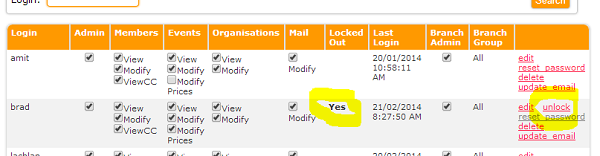
Note. It is not possible to reset the password for a locked account. If the account has been locked out because the user has forgotten their password, the account needs to be unlocked before the password can be reset.
Comments
0 comments
Please sign in to leave a comment.