
1. Navigate to Administration > System Configuration > Products
2. Select the Product you wish to change the shipping cost.
3. Under the heading " Stock and Shipping" you have the following options
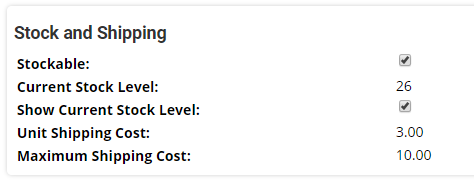
These options will show
- If a product is stockable, ie. do you want MemNet to track stock levels?
- The current stock level. Use this to increase stock levels. The product will display as out of stock once the stock level drops to 0.
- Whether or not to display the stock level on the shopping cart
- The unit shipping cost. If multiple units are purchased, the total shipping will be this amount times the number of units purchased up to the maximum.
- The maximum shipping cost for this product in a transaction.
4. These options can be changed by clicking 'Edit' in the top right corner
Note that in Company Settings you can set a minimum and maximum shipping cost for a transaction, calculated across all products being purchased.
Comments
0 comments
Please sign in to leave a comment.