
Goals and Overview
Configuring this setting allows you to require confirmation of a changed email address when a member updates their email address in self service.
After changing their email address the member will receive an email with a link that will need to be clicked by the member to confirm the new address. In configuration you can change how long a member has to confirm their email address changes.
Email Templates
There are two templates - one sent to the new email to confirm it, called “Email Address Change Validation Email”, and one sent to the old email to cancel the change, called “Email Address Change Cancellation Email”
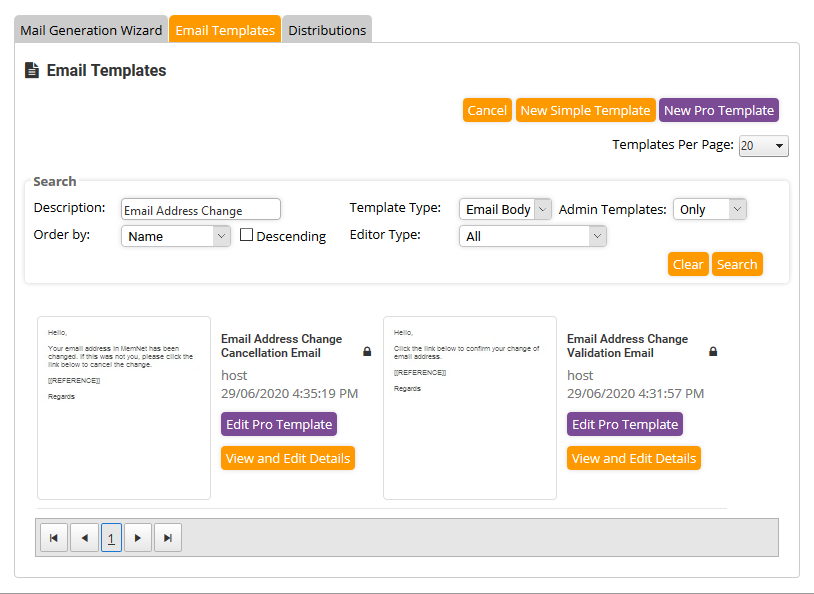
Both these emails require a [[REFERENCE]] merge tag that the validation link will be substituted for.
If Email Validation is enabled, but the email templates are not present or deleted, the validation emails will not be sent. In this case changing your email will not be possible at all until the email templates have been created, as the user will not receive the links.
MemNet Settings
The settings needed are in Administration - System Configuration - Company Settings - Self Service, at the bottom of the third group below the Organisation settings.
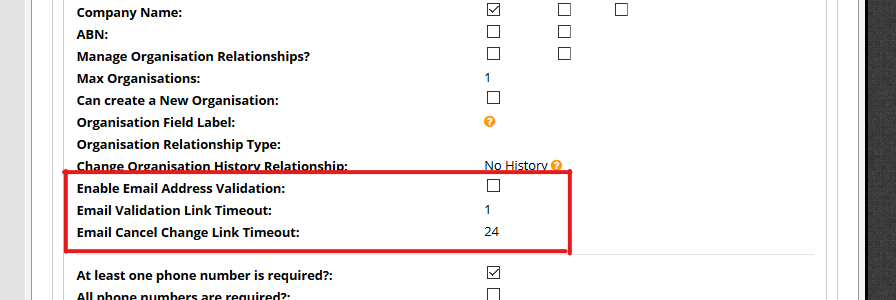
The first option enables email address validation.
The second option is a number that determines how long the validation link is valid for, in hours. By default the time is set to 1 hour.
The third option is a number that determines how long the cancellation link is valid for, in hours. By default the time is set to 24 hours.
Comments
0 comments
Please sign in to leave a comment.